HomeBlogBlogApple Pencil Stylus Cover: Better Grip, Less Wear

Apple Pencil Stylus Cover: Better Grip, Less Wear

Apple Pencil Stylus Cover: Better Grip, Less Wear

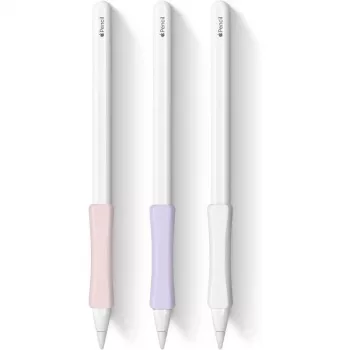
Stylus Cover for Apple Pencil 1/2: A Simple Upgrade for Grip, Protection, and Daily Use

A slim stylus cover can change how an Apple Pencil feels in hand, how well it stays protected in a bag, and how confidently it survives everyday drops and desk bumps. The right sleeve adds traction without getting in the way of charging or pairing, and it can make long note-taking sessions feel steadier and less fatiguing. Below is a practical guide to what these covers do best, what to double-check for Apple Pencil (1st generation) versus Apple Pencil (2nd generation), and how to pick a fit that stays comfortable day after day.

What a Stylus Cover Adds to an Apple Pencil

An Apple Pencil is built for precision, but its smooth finish isn’t always ideal for real-world use—especially if hands get sweaty, you’re moving between classes, or your stylus shares space with keys and chargers. A cover is a small add-on that can make a noticeable difference.

  • Improves grip for longer sessions, especially for sweaty hands, quick handwriting, or fast sketching where the pencil can feel slippery.
  • Adds a protective layer against scratches, scuffs, and minor drops that happen when a stylus is tossed into a backpack or desk drawer.
  • Helps prevent rolling on flat surfaces when the cover includes a flat edge, ridges, or a slightly tackier texture.
  • Makes the stylus easier to spot with color options or a more visible finish—useful in shared classrooms, studios, or offices.
  • Offers a softer feel that can reduce hand fatigue for some users by slightly increasing diameter and adding cushion.

Apple Pencil 1 vs 2: Fit and Charging Details to Confirm

Before choosing a sleeve, confirm which Apple Pencil model you have, because charging and pairing are where most fit issues show up. If you’re unsure, Apple’s model identification guide is a quick reference: Apple Support: Identify your Apple Pencil.

  • Apple Pencil (2nd generation) charges and pairs magnetically on the iPad’s side; a cover must not block the magnetic face or add too much thickness.
  • Apple Pencil (1st generation) charges via the Lightning connector (directly or with an adapter); a cover must allow access to the charging end.
  • Some covers require removing a cap or section for charging—confirm whether that’s a quick on/off cap or a fully removable sleeve.
  • Check that the cover does not interfere with double-tap gestures (Apple Pencil 2) if the area is covered by thick material.
  • A snug fit matters: too loose can shift while writing; too tight can be difficult to remove for charging or cleaning.

Quick compatibility checklist

Apple Pencil model Charging method Cover must allow Common dealbreaker
Apple Pencil (2nd gen) Magnetic side charging Unobstructed magnetic face + minimal thickness Charging/pairing fails or weak magnetic hold
Apple Pencil (1st gen) Lightning connector (direct/adapter) Open access to connector end or removable section Can’t charge without removing entire cover

If pairing ever becomes inconsistent, it’s worth reviewing Apple’s pairing steps to rule out simple issues: Apple Support: Pair Apple Pencil with iPad.

Materials and Feel: Silicone, Rubber, and Hybrid Options

Not all covers feel the same. Material affects grip, pocket friction, lint pickup, and how easy the sleeve is to clean after weeks of use.

  • Silicone: Soft-touch and comfortable with reliable grip. It’s often the best “all-day note-taking” option, though some finishes can attract lint.
  • Rubberized textures: Typically tackier, which feels extra secure for quick movements. The trade-off is that it may feel “draggy” when sliding in and out of a pencil case.
  • TPU-style sleeves: Usually thinner and more durable with easier wipe-down cleaning. They can feel less cushioned, but they’re a solid option when you want minimal added bulk.
  • Thickness trade-off: Thicker sleeves can cushion drops better, but they may affect Apple Pencil 2 magnetic charging or make storage loops too tight.
  • Texture matters for control: Matte finishes often feel steadier for small strokes, neat handwriting, and slow shading.

Everyday Use: Writing Comfort, Storage, and Desk Behavior

A cover isn’t just about preventing scratches—how it changes the writing experience day-to-day is usually what makes it feel “worth it.”

Care and Cleaning

A Budget-Friendly Option: Stylus Cover for Apple Pencil 1/2

Product snapshot

Item Compatible with Price Availability
Stylus Cover for Apple Pencil 1/2 Apple Pencil 1st & 2nd generation (fit depends on sleeve design) $2.67 In stock

Related Desk Setup Add-On

FAQ

Will a cover stop Apple Pencil (2nd gen) from charging on the iPad?

It can if the sleeve adds too much thickness or covers the magnetic charging face. Choose a thin design and test the magnetic hold and charging; if charging is inconsistent, remove the cover while charging.

Do covers affect Apple Pencil accuracy or pressure sensitivity?

No—covers don’t change the tip’s sensor behavior because the tip remains exposed. A better grip can improve control, but bulky sleeves may make double-tap on Apple Pencil (2nd gen) harder to trigger.

How do you clean a silicone stylus cover?

Wash it with mild soap and water, rinse thoroughly, and let it air-dry completely before reinstalling. Avoid strong solvents or high heat, which can warp or break down silicone over time.

Was this article helpful?

Yes No
Leave a comment
Top

Shopping cart

×